Sign in
Add an artifact
HTML, Markdown, PDF, multiple files, or a complete folder
Open the upload formHTML, Markdown, PDF, multiple files, or a complete folder
Open the upload formYour domainSame link after updatesView countsPassword
for $37 once
Regular plans start at $5/month.
For consultants, freelancers and small agencies sharing finished work. Upload HTML, Markdown, PDF or a folder, paste your content, or publish from your agent.
One payment · No monthly fees · 30-day money-back guarantee
Publish real work and see how it fits your workflow. Request a full refund in Account or email support@yarrtifacts.com within 30 days of your confirmed purchase.
Get Lifetime access · $37Your AI tool made something good. Getting it to a client is where it goes wrong.
HTML attachments get blocked, downloaded or shown as raw code. Your client asks if you sent the wrong file.
By default a share link from an AI tool lives on that tool's address. Some tools let you connect a domain, but one page at a time. Others don't allow it at all.
A report in one tool, a deck in another, a calculator in a folder. No single library, and no way to see what was opened.
Yarrtifacts puts all of it in one library, in seconds. Set your custom domain as the default and every new link uses it.
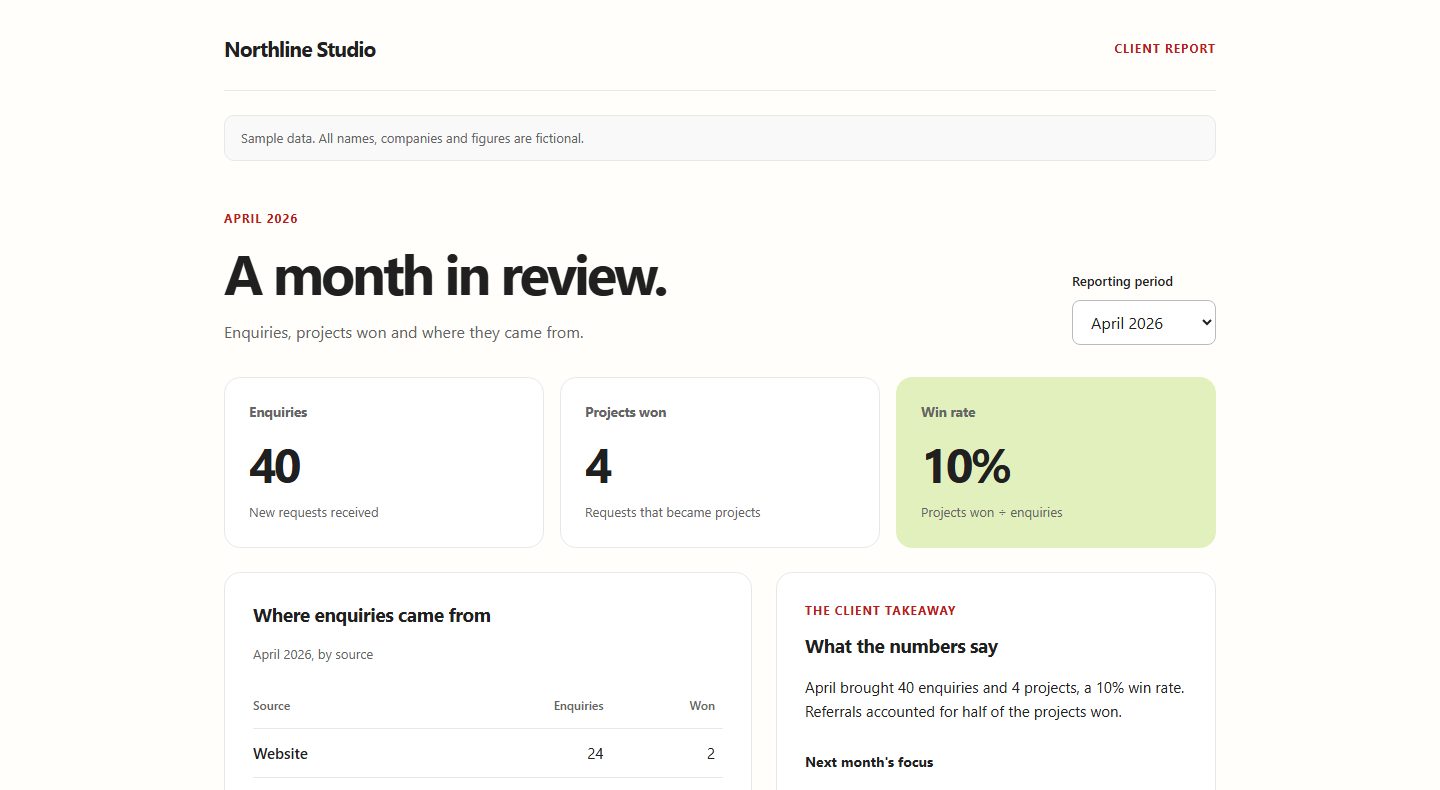
A finished report or audit
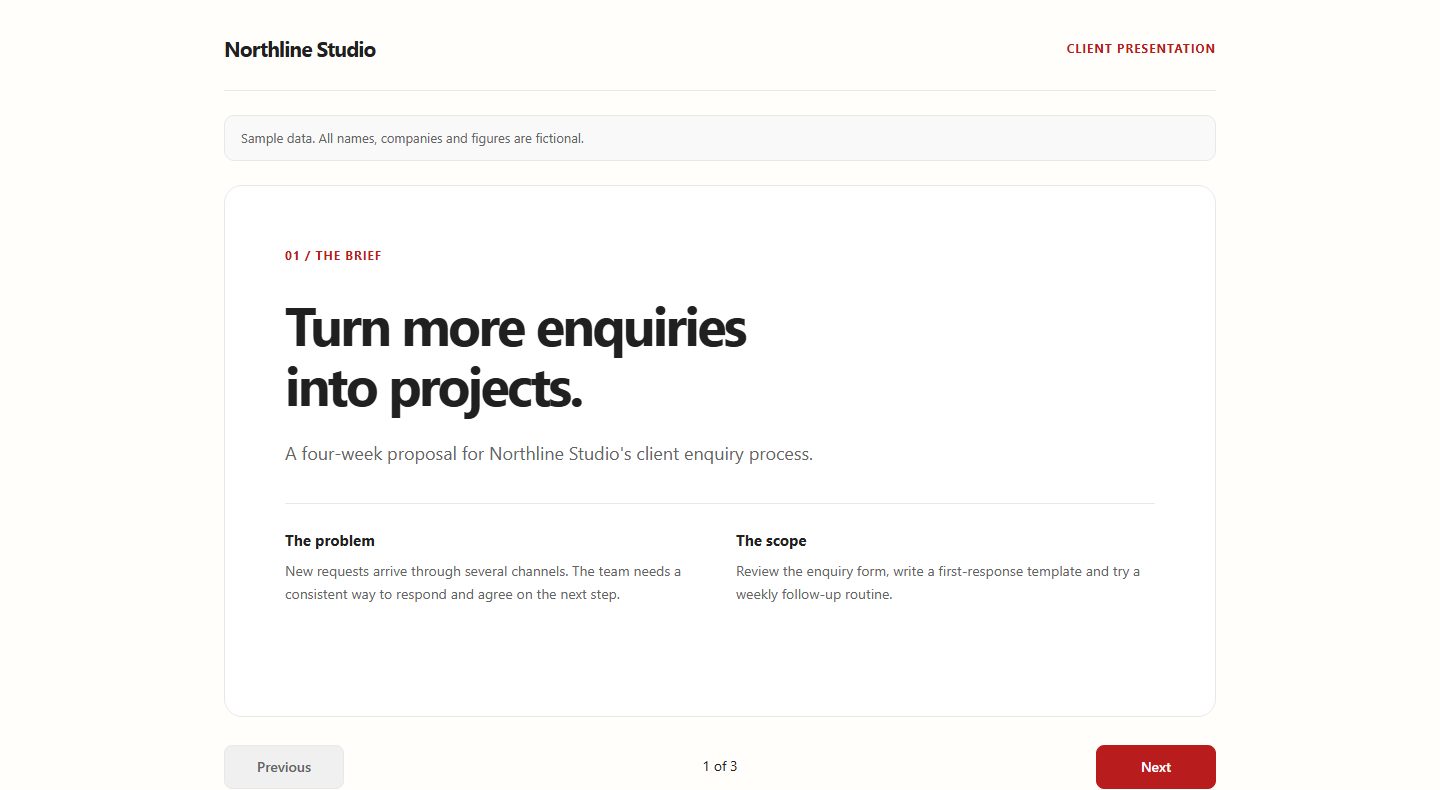
A proposal or presentation
A small interactive tool
Files you can update later
Opens in any browser. No account for your client.
Same link after updates
Your own domain
See how many times it was opened
For anyone whose finished work opens in a browser and goes to someone else.
Audits, findings and strategy reports your client can open and explore, not download.
Client reports and proposals on your agency's domain. Update them and the link stays the same.
Proposals, estimates and portfolios that arrive as your link, not as a file attachment.
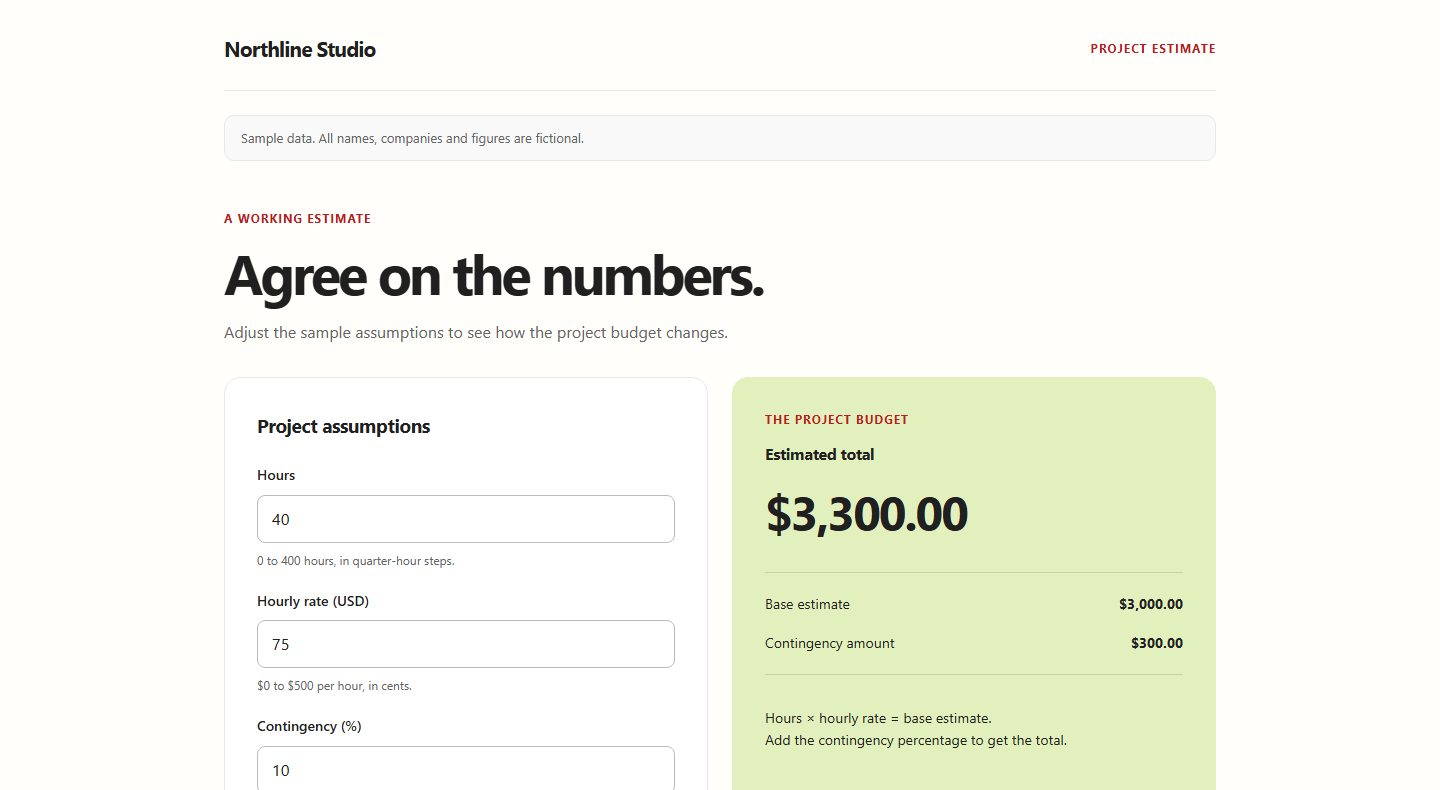
Calculators, dashboards and small tools made in Claude, ChatGPT or Cursor, live in seconds.
What you can publish
Start with an upload. Add agent publishing when it becomes part of your workflow.
Upload files or publish from an agent.
Check the result and activate the public link.
Send one link and update it later.
What you can publish
Try a client report, a presentation and a project calculator. These three demos use fictional companies and sample data.
Publish from agents
Set it up once for your agent. After that you ask for a link and get one back in the chat.

With the plugin on, "publish this" lands on your own domain instead of a claude.ai link.
/plugin marketplace add yarrtifacts/skills/plugin install yarrtifacts@yarrtifacts

Works with Codex CLI, Gemini CLI, Cursor and any agent that reads Agent Skills.
npx skills add yarrtifacts/skills1. Open Plugins → Add → Add custom MCP server.
2. Name it Yarrtifacts, paste this server URL, and choose OAuth. Client registration is automatic.
3. Create the plugin, select Connect, sign in to Yarrtifacts, and choose Allow.
4. Select Try now to start a new ordinary ChatGPT chat with Yarrtifacts selected.
Open ChatGPT Plugins ↗ · Setup guide ↗
Your ChatGPT account or workspace must allow custom MCP servers.
https://yarrtifacts.com/mcpSay this in Claude Code, Codex, Cursor or another connected agent. The first run signs you in through the browser and remembers it.
publish this folder as an artifact
Upload a new version. The shared link stays the same.

See how many times each link was opened.

Put a password on a link or make it private. Shared links stay out of search engines.

HTML, Markdown, PDF, or a whole folder with its assets.

Your links have no automatic expiry while Yarrtifacts operates.
Keep your published artifacts together. Open, download, rename and manage them in one place.
Publishing plans
Everything on this page. One payment, no monthly fee. Pay securely with Stripe.
Lifetime
No recurring fees. Lifetime lasts for as long as Yarrtifacts operates, and your links have no automatic expiry. You can download every artifact from your library at any time, and your domain stays yours. Payment and refund terms.
Questions
Short answers about publishing, agents, domains, updates, and pricing.
No. A public link opens in any browser without an account. If you protect a link with a password, share the password separately. Private artifacts are only for you and need your sign-in.
Yes. Your library brings your published artifacts together. Open or download them, rename them, replace their files, manage access or delete them.
HTML, Markdown, PDF, multiple files, or a complete folder with its assets. You can also paste content or publish from a connected agent. Zips and installers get rejected.
Yes. Upload a new version to replace the published files. The link stays the same.
Yes. Lifetime includes one custom domain. Set a default domain and your new links use it automatically.
Claude Code, Codex CLI, Gemini CLI, Cursor and any agent that reads Agent Skills, plus ChatGPT through a custom MCP server. Setup is in the Agents section above. You can also upload files made in any tool.
Lifetime lasts for as long as Yarrtifacts operates. You can download every artifact from your library at any time, and your custom domain stays yours, so you can point it somewhere else.
Request a full refund in Account or email support@yarrtifacts.com within 30 days of your confirmed Lifetime purchase. A confirmed full guarantee refund ends the access funded by that purchase. If you have no other current paid access, your account returns to Free and public links stop. You keep your files and owner access.
Drop the files. Check the preview. Send it professionally.
 A finished report or audit
'%20clip-path='url(%23clip0_0_12)'%3e%3cg%20id='Black'%20fill='%2365A30D'%3e%3cpath%20id='Vector'%20d='M6.31802%200.921691C5.69046%201.20074%205.31731%201.78419%204.47774%203.79669L4.21484%204.42243L5.03746%206.92537C5.49541%208.30368%205.89399%208.45368%205.91943%208.47904C5.95336%208.51287%206.21625%208.55515%206.51307%208.58051C6.94558%208.61434%207.03887%208.59743%207.03887%208.49596C7.03887%208.36912%206.56396%207.71176%205.97032%205.80073C5.81767%205.29338%205.70742%204.85368%205.72438%204.81985C5.74134%204.79449%206.33498%204.8114%207.05583%204.87059C7.7682%204.92132%2010.5159%205.11581%2013.1618%205.29338L17.9703%205.61471L19.0643%207.3989C19.6664%208.37132%2020.4721%209.6989%2020.8537%2010.3331L21.5491%2011.5H21.9562C22.4396%2011.5%2022.6431%2011.314%2023.0926%2010.4853C24.2375%208.37132%2024.212%205.8261%2023.0163%203.92353C22.5074%203.09485%2021.5915%202.25772%2020.8028%201.88566C20.2261%201.60662%2020.082%201.58125%2019.0558%201.5136C18.4367%201.47132%2015.6042%201.28529%2012.7548%201.09926C9.9053%200.913235%207.36113%200.761029%207.11519%200.761029C6.86078%200.761029%206.50459%200.828676%206.31802%200.921691Z'%20fill='black'/%3e%3cpath%20id='Vector_2'%20d='M19.3866%2013.1996C17.9873%2013.707%2016.8339%2014.1382%2016.817%2014.1467C16.8085%2014.1636%2016.7322%2015.7364%2016.6643%2017.639C16.5965%2019.5415%2016.5201%2021.4864%2016.4862%2021.9515C16.4608%2022.425%2016.4693%2022.8309%2016.5117%2022.8562C16.5456%2022.8732%2017.0035%2022.7294%2017.5124%2022.5349C18.0297%2022.332%2019.0898%2021.9176%2019.8869%2021.6132C20.6756%2021.3004%2021.3541%2021.0213%2021.388%2020.9875C21.4304%2020.9452%2021.5746%2019.4908%2021.7187%2017.7489C21.8544%2016.007%2022.0071%2014.1636%2022.0495%2013.6563C22.1597%2012.4301%2022.1597%2012.261%2022.0325%2012.2695C21.9731%2012.2695%2020.7774%2012.6923%2019.3866%2013.1996Z'%20fill='black'/%3e%3cpath%20id='Vector_3'%20d='M0.0424028%2013.3265C0.0678445%2013.5548%200.14417%2014.3327%200.212014%2015.0515C0.440989%2017.4614%200.763251%2020.7507%200.805654%2021.1989L0.856537%2021.6386L1.29753%2021.6893C1.54346%2021.7147%202.97668%2021.85%204.4947%2021.9938C6.01272%2022.129%209.06572%2022.4165%2011.2792%2022.6195C13.4926%2022.8224%2015.3329%2022.9577%2015.3668%2022.9239C15.4601%2022.8393%2015.7993%2014.3665%2015.7145%2014.2904C15.6806%2014.2482%2014.5018%2014.1213%2013.1025%2014.0029C6.00424%2013.3941%201.65371%2013.0221%200.865018%2012.9713L-0.00848057%2012.9121L0.0424028%2013.3265ZM8.57385%2015.4996C9.0318%2015.804%209.24382%2016.193%209.24382%2016.7173C9.24382%2017.2331%209.16749%2017.4276%208.81131%2017.7996L8.57385%2018.0533L8.75194%2019.1272C8.85371%2019.7191%208.91307%2020.2265%208.87915%2020.2603C8.81979%2020.3195%206.88622%2020.1757%206.81837%2020.1081C6.80141%2020.0827%206.86078%2019.6007%206.95406%2019.0342L7.12368%2017.9941L6.87774%2017.7151C6.20777%2016.954%206.39435%2015.7956%207.25088%2015.4235C7.65795%2015.246%208.24311%2015.2798%208.57385%2015.4996Z'%20fill='black'/%3e%3c/g%3e%3cpath%20id='Vector%2015'%20d='M15%2012.5L2%2011.5L3%209.5L6%2010L9%209.5L10.5%208L12%208.5L13.5%2010.5L16.5%208L18.5%2011.5L15%2012.5Z'%20fill='black'/%3e%3c/g%3e%3cdefs%3e%3cclipPath%20id='clip0_0_12'%3e%3crect%20width='24'%20height='23'%20fill='white'/%3e%3c/clipPath%3e%3c/defs%3e%3c/svg%3e) Opens in any browser. No account for your client.




 Open report